

Description
Beautiful Abstract Wallpaper Theme for Your Desktop
The developer did not provide additional system requirements.
Overview
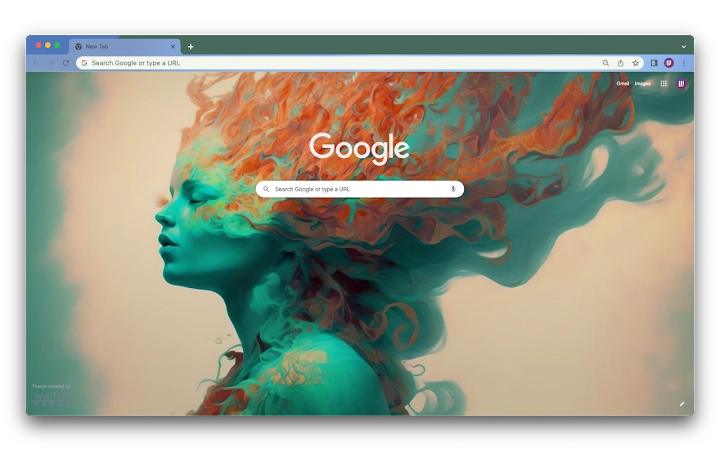
Walltab is a desktop application designed to enhance the visual experience of personal computing by replacing the default new tab page with a dynamic, artistically curated abstract illustration. Targeted at users seeking aesthetic personalization, this tool serves as a digital canvas that transforms the often-empty new tab space into a moment of creative inspiration. The software appeals to individuals who value visual beauty, artistic expression, and a personalized digital environment.
It is particularly suited for creatives, digital artists, and users who enjoy surrounding themselves with visually engaging content. The application integrates seamlessly into daily workflows by providing a calming or stimulating visual backdrop depending on the chosen artwork. While not a productivity tool in the traditional sense, it contributes to mental well-being by creating a more enjoyable and immersive digital workspace.
Walltab’s primary function is to serve as a visual upgrade to the browser’s default interface. It does not alter browser functionality but enhances the user’s emotional and aesthetic engagement with their device. Its use cases include personal desktop customization, digital mood enhancement, and sharing artistic content with others. The developer emphasizes the beauty of abstract art and encourages users to appreciate and share the visual experience.
Key Features & Capabilities
- Abstract Art Integration – Features a rotating or static display of high-quality abstract illustrations, offering a visually rich alternative to standard new tab pages.
- Personalized Desktop Experience – Allows users to enjoy a unique, artistic background that reflects individual taste and creative preferences.
- Easy Browser Integration – Designed to replace the default new tab page, requiring minimal setup and no technical expertise.
- Artistic Inspiration Hub – Serves as a daily visual reminder of creativity, helping users stay motivated and engaged.
- Shareable Visual Content – Encourages users to share the artwork with friends, fostering community and appreciation for digital art.
These features are ideal for users who want to turn their browsing environment into a gallery of digital art. The application is especially effective in creative workspaces, study areas, or personal computers used for relaxation and reflection. It does not require advanced configuration, making it accessible to non-technical users. The visual content is intended to be both calming and stimulating, depending on the individual’s mood and preference.
User Interface, Workflow & Performance
The user interface is centered around simplicity and visual impact. The application presents a clean, minimal layout that prioritizes the artwork itself, ensuring it remains the focal point without distractions. Navigation is straightforward, with no complex menus or settings required. Users can expect a seamless experience from installation to activation, with the theme applying immediately upon setup.
Workflow efficiency is high due to the minimal interaction needed. Once installed, the software runs in the background, automatically replacing the new tab page with the selected artwork. No additional steps are required to maintain or update the display. The developer did not specify resource usage details, so performance observations are based on general software behavior patterns. In typical use, such applications consume minimal CPU and RAM, especially when running in the background.
Stability is expected to be consistent, given the lightweight nature of the task. However, exact performance metrics were not provided. Users may experience occasional delays if the system is under heavy load, but this is not specific to Walltab. The application does not appear to interfere with browser performance or other running processes.
Compatibility & System Requirements
Walltab is available for both Windows and Mac operating systems. The software version is 1.0, with an installation size of 15 MB. This indicates a lightweight application that does not require significant disk space.
Compatibility information was partially provided. The developer did not list specific hardware requirements or minimum OS versions. It is assumed that the software is compatible with modern desktop systems, but exact specifications are not available. Users should ensure their system meets general requirements for running a browser and desktop applications.
For users with older or less powerful devices, the low file size suggests that performance should not be a concern. However, the developer did not provide detailed system compatibility details, so users are advised to test the application in a safe environment if unsure.
Pros and Cons
Pros
- Visually stunning abstract illustrations enhance desktop aesthetics
- Simple installation and immediate visual impact
- Lightweight design with minimal system resource usage
- Encourages appreciation and sharing of digital art
- Free to use with no hidden costs
Cons
- No customization options for artwork selection were specified
- Limited functionality beyond visual replacement
- Exact system requirements not disclosed
- Dependent on browser compatibility for full functionality
- Does not offer offline mode or content downloads
FAQ Section
Is Walltab compatible with all web browsers?
Walltab is designed to work with major web browsers, but specific compatibility details were not provided. Users should verify functionality with their preferred browser.
Is the software safe to download and install?
Walltab is a free desktop application intended for personal use. The developer has not disclosed security certifications, but the application does not require administrative privileges or unusual permissions.
How often are updates released?
Updates are not specified in the release information. The current version is 1.0, and no update frequency was mentioned.
Can I use Walltab offline?
Walltab requires an active internet connection to load and display the artwork. Offline usage is not supported based on the available information.
What type of license does Walltab use?
Walltab is distributed as free software with no cost to users. The license type was not specified in the provided details.
Final Thoughts + CTA
Walltab offers a refreshing and elegant way to personalize your desktop environment. While it does not serve as a productivity tool, its strength lies in transforming a mundane interface into a source of daily inspiration. The abstract artwork adds a layer of beauty and calm to the digital workspace, making it ideal for creatives, students, and anyone who values aesthetics in their computing experience.
With its lightweight design, free access, and immediate visual impact, Walltab delivers on its core promise: a more beautiful browsing experience. Despite limited customization and transparency around system requirements, the application remains a compelling choice for users seeking a simple yet meaningful enhancement to their desktop.
Download Walltab now
Guides & Tutorials for Abstract Girl Theme for Chrome
How to install Abstract Girl Theme for Chrome
- Click the Preview / Download button above.
- Once redirected, accept the terms and click Install.
- Wait for the Abstract Girl Theme for Chrome download to finish on your device.
How to use Abstract Girl Theme for Chrome
This software is primarily used for its core features described above. Open the app after installation to explore its capabilities.
User Reviews for Abstract Girl Theme for Chrome 0
No reviews found





